
Overview
This may be common knowledge for some, but I struggled with this longer than I care to admit. That’s exactly why it’s going into a post on this website. I know I’ll refer back to it in the future, and hopefully future me will be grateful.
RTFM
Configure Port Binding for iSCSI or iSER on ESXi
Background on This
I am experimenting with IPv6 in my lab, and my ESXi hosts kept flapping in vCenter. To eliminate variables, I reset my physical ESXi hosts and started fresh. After the reset, I reapplied the configuration steps from the following post so that I am properly set up for nested networking in the future.
Because the host was reset, the Storage Array Type Plug-in (SATP) rules were removed. It is a good idea to reconfigure those before adding the iSCSI storage.
Configure iSCSI on TrueNAS
I am not going to dive into every detail of configuring iSCSI on TrueNAS, but I will outline the high-level steps. For this lab, I am using TrueNAS CORE.
- Create two dedicated VLAN (or physical) interfaces for storage traffic
- Network > Interfaces
- Configure Block storage
- Storage > Pools > Add Zvol
- Configure basic iSCSI service
- Sharing > Block Shares (iSCSI) > Portals — make sure two portals exist, one for each interface created previously

- Sharing > Block Shares (iSCSI) > Initiator Groups — add a group that allows all initiators (this can be secured later if desired)

- Sharing > Block Shares (iSCSI) > Targets — add a target using the storage and Initiator Groups configured previously

- Sharing > Block Shares (iSCSI) > Extents — Create an extent from the storage provisioned earlier using the device

- Sharing > Block Shares (iSCSI) > Associated Targets — tie it all together

- Sharing > Block Shares (iSCSI) > Portals — make sure two portals exist, one for each interface created previously
- Ensure the service is enabled
- Services > iSCSI > Running
- Services > iSCSI > Start Automatically
Configure ESXi
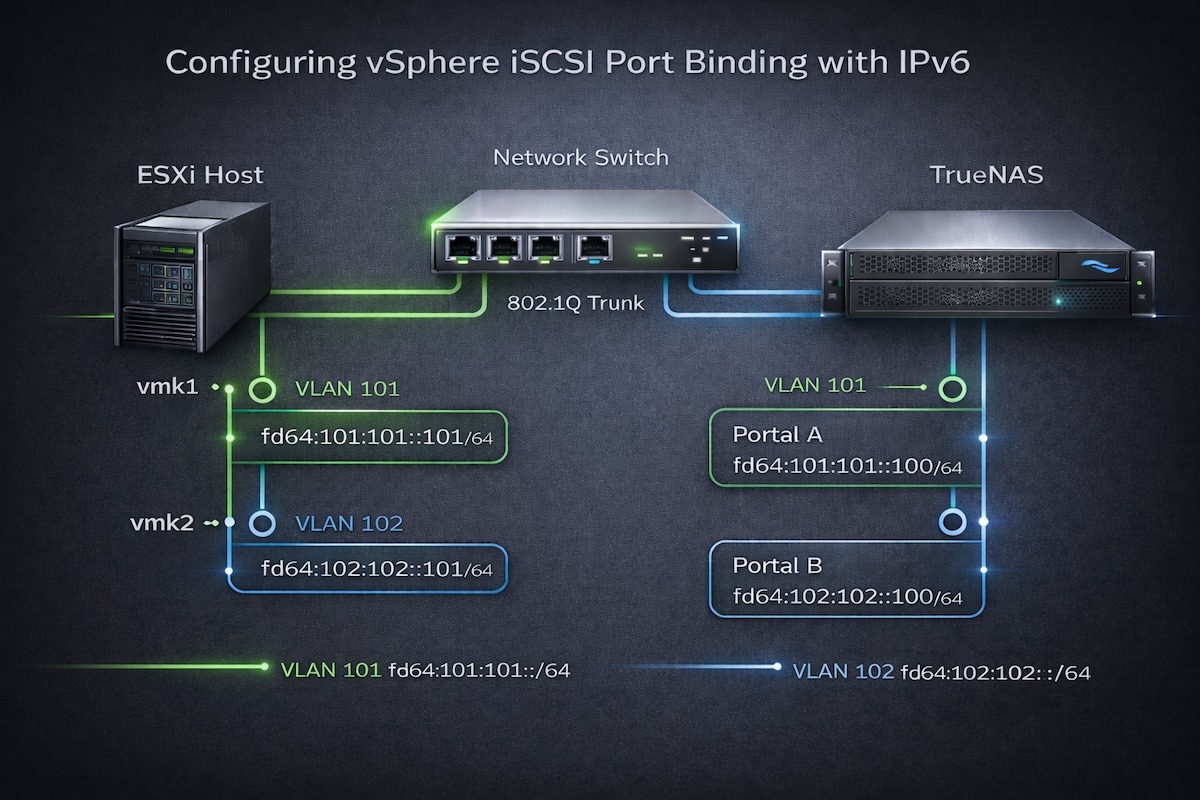
I use two 10 Gbps interfaces on each host and segment the network using VLAN-backed virtual networks.
Networking
The physical switch should already be configured for jumbo frames, so 9216 or similar according to the vendor and hardware. Be sure to increase the MTU on the virtual switch to 9000 to support jumbo frames.

I am not using IPv4 for storage, so ESXi automatically assigns an APIPA address. The link-local IPv6 address is also configured automatically. I manually assigned a Unique Local Address (ULA) starting with fd64:. No square brackets are required when entering the IPv6 address in this version of ESXi.

Once both VMkernel NICs are configured, alter the NIC teaming policy. I configure iSCSI-A to be active on vmnic0.

I configure iSCSI-B to be active on vmnic1.

This is required so that port binding can be configured in the storage set up.
Storage
Activate the Software iSCSI adapter (or use a physical adapter).
Storage > Adapters > Configure iSCSI (assuming it’s been added or enabled)
The first step is to populate the Network Port Bindings section with the two VMkernel NICs. Notice that the UI displays the APIPA IPv4 addresses rather than the IPv6 addresses. It would be nice to see the UI updated to reflect IPv6 more clearly.
You can configure a single dynamic target and both paths will typically be discovered, but I prefer to configure both explicitly.

When this screen is complete, make sure just the iSCSI Software Adapter is highlighted (don’t click on the link) and select the Rescan icon.

If this is the first time the storage device is being added, then there will not be a datastore. If just reattaching a datastore, it should show up under Datastores. There may be a Device but no Datastore, this is an indicator the datastore needs to be configured.
Conclusion
Configuring vSphere iSCSI with IPv6 works exactly as expected once the fundamentals are applied correctly. Although documentation suggests that port binding is not always required, my experience with IPv6 and multiple VMkernel interfaces proved that deterministic binding removes ambiguity. After explicitly binding each VMkernel NIC to the Software iSCSI adapter, discovery and multipathing behaved predictably and reliably.
Leave a Reply