
Overview
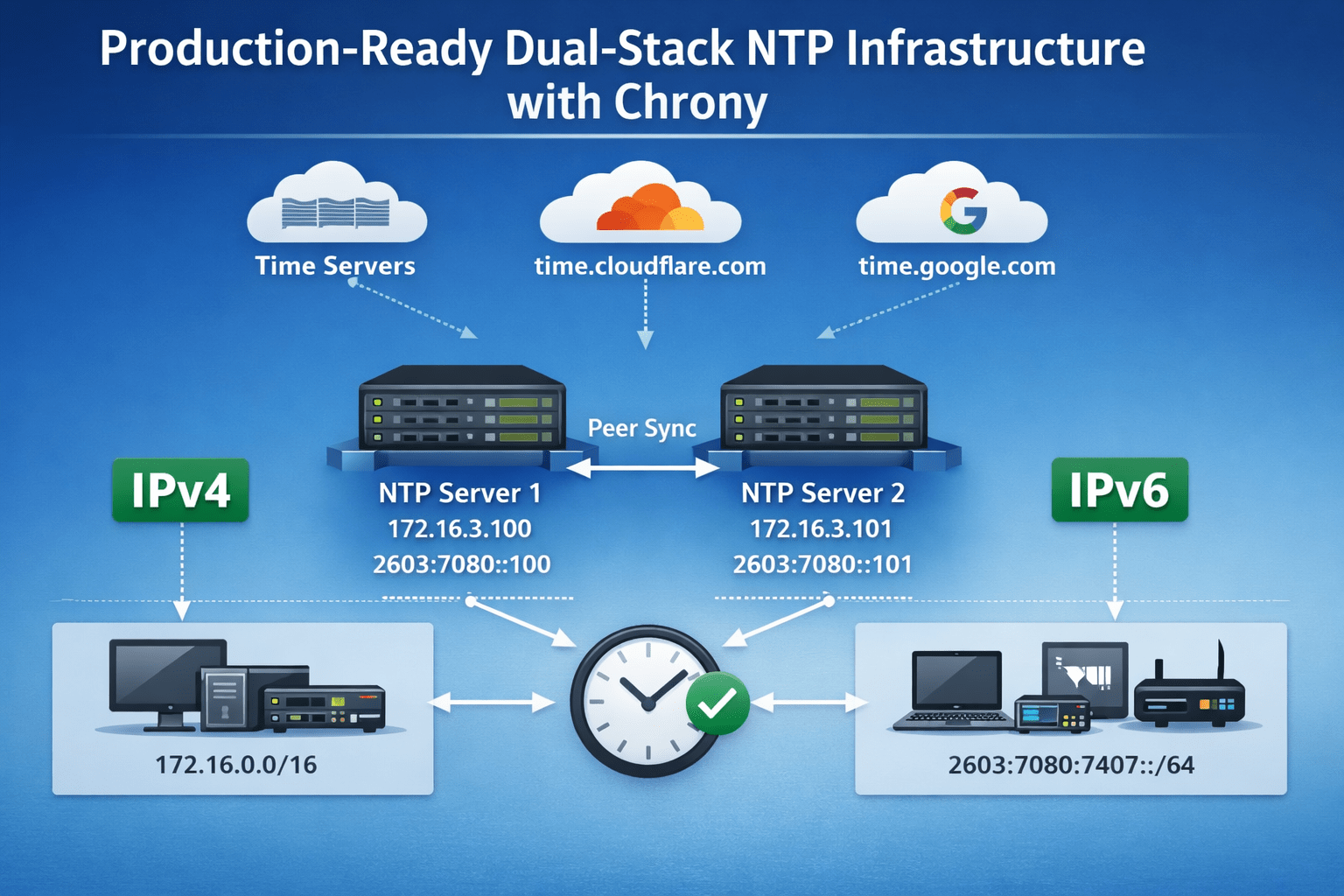
In this post, I walk through how I configured NTP using Chrony. As I continue experimenting with dual-stack environments, these servers are designed to provide time over both IPv4 and IPv6.
Infrastructure Details
The first step is confirming that both IPv4 and IPv6 addresses are available on the system.
ip address2: ens34: <BROADCAST,MULTICAST,UP,LOWER_UP> mtu 1500 qdisc mq state UP group default qlen 1000
link/ether 00:0c:29:a1:c8:b5 brd ff:ff:ff:ff:ff:ff
altname enp2s2
altname enx000c29a1c8b5
inet 172.16.3.100/24 brd 172.16.3.255 scope global noprefixroute ens34
valid_lft forever preferred_lft forever
inet6 2603:7080:7407:dd34:20c:29ff:fea1:c8b5/64 scope global dynamic noprefixroute
valid_lft 86301sec preferred_lft 86301sec
inet6 fe80::20c:29ff:fea1:c8b5/64 scope link noprefixroute
valid_lft forever preferred_lft foreverI have two virtual machines dedicated to providing NTP services:
- dnsntp1-v163-100
- 172.16.3.100
- 2603:7080:7407:dd34:20c:29ff:fea1:c8b5
- dnsntp2-v163-101
- 172.16.3.101
- 2603:7080:7407:dd34:20c:29ff:fe87:ff78
Configuring
The main Chrony configuration file is located at /etc/chrony.conf. This single file controls the behavior of the chronyd.service.
The configuration itself is straightforward. The following sections outline the core settings that should be applied to each NTP server.
Server Pools
Server pools provide hostname-based time sources and represent a one-to-many relationship. This avoids maintaining individual IPv4 and IPv6 addresses while still allowing Chrony to resolve multiple upstream servers dynamically.
pool 2.rocky.pool.ntp.org iburst maxsources 2
pool time.cloudflare.com iburst maxsources 2
pool time.google.com iburst maxsources 2
Peer
Because I am deploying two NTP servers, I want to avoid a split-brain scenario. Each server is configured to peer with the other using IP addresses rather than hostnames. This removes any dependency on DNS availability.
Be sure to swap the peer IP address on the opposite server.
# Peer
peer 172.16.3.101
Server Hardening
These settings help keep the configuration tight and predictable:
- Provide a safe local fallback if all external sources fail
- Allow limited stepping on startup
- Keep the hardware clock synchronized
- Require multiple valid sources
makestep 1.0 3
rtcsync
minsources 2
local stratum 10
Allowed Clients
Finally, I define which subnets are allowed to receive time from the NTP servers. This limits exposure and keeps the service scoped to the intended infrastructure.
allow 127.0.0.1
allow 172.16.0.0/16
allow 2603:7080:7407:dd36::/64
When all the settings are configured for your environment, save and close the file. Restart the service.
sudo systemctl restart chronyd.serviceMonitoring the Service
Chrony provides several built-in tools to monitor synchronization status and source health:
- chronyc tracking
- chronyc sources -v
- chronyc sourcestats
The output from these commands makes it easy to confirm peer health, upstream reliability, and overall clock stability.
Tracking
chronyc tracking
Reference ID    : DA498B23 (time2.google.com)
Stratum         : 3
Ref time (UTC)  : Tue Feb 03 15:21:43 2026
System time     : 0.000085068 seconds fast of NTP time
Last offset     : +0.000005815 seconds
RMS offset      : 0.000083750 seconds
Frequency       : 0.396 ppm slow
Residual freq   : -0.002 ppm
Skew            : 0.073 ppm
Root delay      : 0.036965232 seconds
Root dispersion : 0.015774220 seconds
Update interval : 64.9 seconds
Leap status     : Normal
Sources
This tool is very helpful. From it’s output, we can determine the list of servers (^) and peers (=). We can see what Stratum the servers we are connected to as a reference reliability, the lower, the better.
chronyc sources -v

  .-- Source mode  '^' = server, '=' = peer, '#' = local clock.
 / .- Source state '*' = current best, '+' = combined, '-' = not combined,
| /             'x' = may be in error, '~' = too variable, '?' = unusable.
||                                                 .- xxxx [ yyyy ] +/- zzzz
||      Reachability register (octal) -.           |  xxxx = adjusted offset,
||      Log2(Polling interval) --.      |          |  yyyy = measured offset,
||                                \     |          |  zzzz = estimated error.
||                                 |    |           \
MS Name/IP address         Stratum Poll Reach LastRx Last sample
===============================================================================
^+ time.cloudflare.com           2   7   377    57   +228us[ +234us] +/-   45ms
^+ time.cloudflare.com           2   8   377   254   +123us[ +263us] +/-   42ms
^+ 2600:4040:e0eb:ea00::cbb>     2   7   377   118   +205us[ +211us] +/-   44ms
^+ 2602:f9f3:1:2f::123:123       2   7   377   125   +213us[ +240us] +/-   44ms
^* time2.google.com              2   6   377    59   +453us[ +459us] +/-   45ms
^+ time1.google.com              2   8   377   256    +71us[ +212us] +/-   42ms
=+ dnsntp2-163-101.lab.aaro>     3   8   377   126    +55us[  +55us] +/-   35ms
Sourcestats
chronyc sourcestats
Name/IP Address            NP  NR  Span  Frequency  Freq Skew  Offset  Std Dev
==============================================================================
time.cloudflare.com         7   5  1035     +0.134      0.255    +84us    28us
time.cloudflare.com         6   3  1161     +0.114      0.450    +51us    60us
2600:4040:e0eb:ea00::cbb>   6   5   775     +0.257      0.316   +105us    21us
2602:f9f3:1:2f::123:123     7   5  1162     +0.118      0.180    +69us    28us
time2.google.com           11   7  1165     +0.130      0.178    +86us    42us
time1.google.com            9   7   25m     +0.017      0.337    +47us   105us
dnsntp2-163-101.lab.aaro>  26  15   40m     -0.356      0.159   -408us   125us
Conclusion
This configuration provides a stable, production-ready NTP service capable of serving both IPv4 and IPv6 clients. By combining multiple upstream sources, explicit peer relationships, and basic hardening, Chrony delivers accurate time while remaining resilient to upstream or DNS-related failures.
Leave a Reply